Weighted Grade Calculator
Some numbers matter more than others. A final exam usually counts for more than a single homework assignment, and a big position in your portfolio moves your returns far more than a tiny one. A regular average treats everything equally, which is exactly why it gives you the wrong answer in cases like these. This weighted average calculator fixes that: enter your values, assign a weight to each one, and it works out the true average in seconds. Free, online, and no sign-up.
Use it as a weighted mean calculator for statistics, a weighted grade calculator for your courses, a weighted score calculator for a decision matrix, or a weighted percentage calculator for anything where the inputs carry different importance. The math underneath is identical — only the labels change.
Weighted Grade Calculator
Combine assignments by their weight to find your overall grade.
Category Grade % Weight %See the average you need on any weight you have not entered yet.Your grade —Enter a grade and weight on any row to see your result.
Need on the rest —How weighted grades work
A weighted grade reflects how much each part of your course actually counts. Instead of averaging every score equally, each category is multiplied by its weight, the results are added together, and the total is divided by the sum of the weights.
Formula:grade = Σ(score × weight) ÷ Σ(weight)Example: a 90 worth 40% and an 80 worth 60% give (90 × 40 + 80 × 60) ÷ 100 = 84%. If your weights do not yet add up to 100%, set a target above and the calculator shows the average you would need on the remaining weight.
Each category grade is multiplied by its weight, the products are added together, and the total is divided by the sum of the weights. So 90 at 40% and 80 at 60% equals (90 × 40 + 80 × 60) ÷ 100 = 84.
For a final course grade, yes. If they total less, this calculator shows your grade so far and, when you set a target, the average you would need across the remaining weight.
An unweighted grade treats every score equally. A weighted grade counts some categories, such as a final or a project, more heavily, which matches how most syllabi are actually graded.
What Is a Weighted Average?
A weighted average (also called a weighted mean, or more formally a weighted arithmetic mean) is an average in which each value is given a weight that reflects its relative importance. Instead of every data point counting the same, some values pull harder on the result than others.
Think of the weight as a measure of significance. A value with a large weight has more influence on the final mean; a value with a small weight barely nudges it. Weights can be whole numbers, decimals, or percentages — what really matters is the proportion each one represents relative to the total weight.
Here’s the everyday version. If your course grade is 70% exams and 30% homework, those percentages are the weights. Score 90 on your exams and 60 on homework, and your real grade leans toward the 90 because exams carry more weight. A simple average would tell you 75. The weighted average tells you the truth: 81.
Weighted Average Formula
The weighted average formula looks more intimidating than it actually is:
Weighted Average = (Σ of value × weight) ÷ (Σ of weights)
The Σ symbol (sigma) is just summation notation — it means “add all of these up.” So the numerator is the weighted sum: you multiply each value by its weight and add the products together. The denominator is the total weight: the sum of all the weights.
In plain words, you multiply each value by its weight to get its product, add all those products together to get the weighted sum, add up all the weights to get the total weight, and divide the first by the second.
Worked example. A student has three test scores, each with a different weight:
| Test | Score (value) | Weight |
|---|---|---|
| Quiz | 80 | 1 |
| Midterm | 75 | 2 |
| Final exam | 90 | 3 |
Multiply each value by its weight, then add the products: (80 × 1) + (75 × 2) + (90 × 3) = 80 + 150 + 270 = 500. Add the weights: 1 + 2 + 3 = 6. Divide: 500 ÷ 6 = 83.3.
The final exam, with the biggest weighting factor, pulled the average up toward 90 — exactly what you’d expect.

How to Calculate a Weighted Average Step by Step
You can follow these steps by hand, or just let the calculator above do them for you:
- List your values. These are the numbers you’re averaging — test scores, prices, ratings, whatever your data set contains.
- Assign a weight to each value. The weight is the relative importance of that data point. Bigger weight, bigger influence.
- Multiply each value by its weight. This gives you the product for each row.
- Add the products together. This sum of the products is your numerator (the weighted sum).
- Add the weights together. This total is your denominator (the total weight).
- Divide. Weighted sum ÷ total weight = your weighted average.
One shortcut: if your weights are percentages that already add up to 100% (or proportions that add up to 1), they’re already normalized — so the weighted sum is your answer, and you can skip the final division.
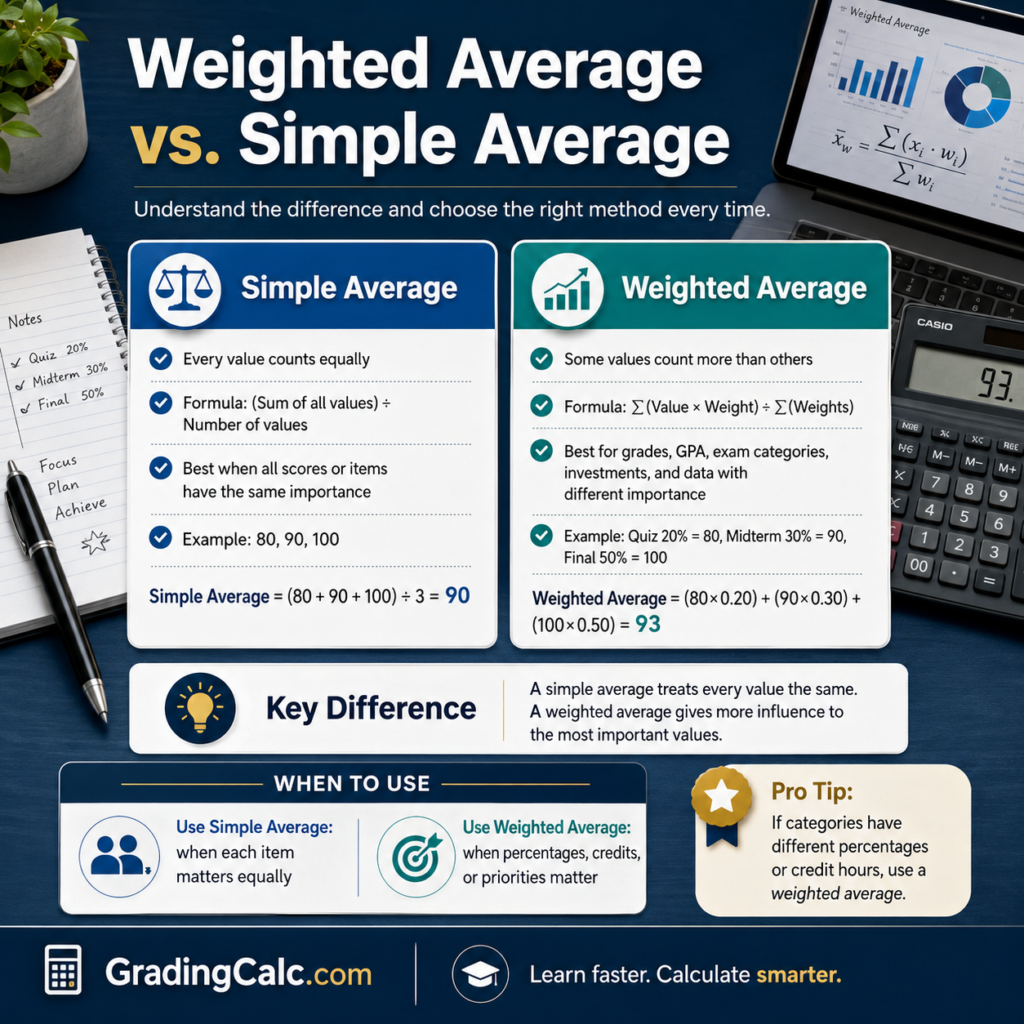
Weighted Average vs. Simple Average
The difference between a weighted and unweighted average comes down to a single question: do all your values deserve an equal say?
A simple average — the plain arithmetic mean, or regular average — adds up your values and divides by how many there are. Every number counts the same. It’s the right tool when your data points are genuinely equal, like five test scores that each count for 20%.
A weighted average lets some values matter more than others. Reach for it when your inputs have different importance, different sizes, or different frequencies.
Quick comparison: the numbers 50 and 100, averaged simply, give you 75. But if the 100 carries three times the weight of the 50, the weighted mean is 87.5. Same two numbers, very different result — because the weighting changes what “average” actually means here.
As a rule of thumb, use a weighted average whenever you catch yourself thinking “but this one counts for more.” Stick with a simple average when everything truly counts the same.
Common Uses
Weighted averages show up everywhere once you start looking. Here are the situations people use this calculator for most.
Weighted Grades & GPA
This is the classic one. Most syllabuses use category weights — homework, quizzes, a midterm, and a final exam each contribute a set percentage to your course grade. A weighted grade calculator combines those category weights into your final grade, and a weighted exam score calculator tells you what you need on the last test to hit your target.
Your GPA works the same way, just with credit hours as the weights. A weighted GPA calculator multiplies each course grade by its credit hours, adds the products, and divides by your total credits — so a 4-credit course affects your grade point average twice as much as a 2-credit one. (Weighted vs unweighted GPA is a slightly different idea: there, “weighted” usually means honors and AP classes are bumped up on a 5.0 scale instead of the standard 4.0.)
Finance (Cost, Interest Rate, Portfolio)
Finance runs on weighted averages. A weighted average cost calculator finds your average cost basis when you’ve bought the same stock at different prices — each purchase is weighted by the number of shares. The weighted average cost of capital (WACC) blends the cost of a company’s debt and equity by their share of total funding. A weighted average interest rate calculator does the same for loan consolidation, weighting each loan’s rate by its balance. And portfolio weighting and asset allocation use it to turn the returns of individual holdings into your overall expected return.
Weighted Scoring & Decision Matrix
When you’re choosing between options — a job offer, a vendor, a new apartment — a weighted scoring model keeps the decision honest. You list your criteria, give each one a weight based on how much you care about it, score every option against each criterion, and let a weighted decision matrix calculator combine them. The option with the highest weighted score wins, and you’ve made your trade-offs explicit instead of going on gut feel. Performance reviews, KPIs, and survey results (think Likert scales) get scored the very same way.
How to Calculate a Weighted Average in Excel or Google Sheets
You don’t need a special formula for spreadsheets — one built-in function handles it:
=SUMPRODUCT(values, weights) / SUM(weights)
SUMPRODUCT multiplies each value by its matching weight and adds the products in a single step (that’s your numerator). SUM adds up the weights (your denominator). Divide one by the other and you have your weighted average. For example, if your values sit in cells B2:B10 and your weights in C2:C10, you’d write =SUMPRODUCT(B2:B10, C2:C10) / SUM(C2:C10).
FAQ
What is a weighted average? It’s an average in which each value is multiplied by a weight that reflects its relative importance, so some data points influence the result more than others. The formal name is the weighted arithmetic mean.
How do you calculate a weighted average? Multiply each value by its weight, add up all the products, then divide by the sum of the weights. The calculator above does all of this automatically.
What is the formula for a weighted average? Weighted average = (Σ of value × weight) ÷ (Σ of weights). In words: the weighted sum divided by the total weight.
How is a weighted average different from a regular average? A regular (simple) average treats every value equally. A weighted average lets you assign different importance to different values, so larger weights have more pull on the result.
How do I assign weights, and what should they add up to? Set each weight according to how important that value is — the bigger the weight, the bigger the influence. They don’t have to add up to anything specific, because the formula divides by the total. That said, it’s common to use percentages that sum to 100% or proportions that sum to 1.
Can the weights be percentages? Yes. Percentages are one of the most common ways to express weights. If they already add up to 100%, they’re normalized, and the weighted sum is your answer directly.
How do I calculate a weighted grade or weighted GPA? For grades, weight each category (homework, quizzes, exams) by its percentage of the course, then combine. For GPA, weight each course grade by its credit hours and divide by your total credit hours.
Why use a weighted average instead of a simple average? Because a simple average gives the wrong answer when your values aren’t equally important. Whenever some inputs should count for more — bigger positions, heavier exam weighting, more significant criteria — a weighted average reflects reality while a simple one distorts it.
How do I calculate a weighted average in Excel? Use =SUMPRODUCT(values, weights)/SUM(weights). SUMPRODUCT handles the numerator and SUM handles the denominator.